Beberapa hal berguna untuk Anda
Kami telah memilih beberapa hal menarik yang mungkin menarik bagi Anda
Top QR Code Generators Every Marketer Should Use
To create a QR code for a link, video or picture - click on the button below.


- Why Marketers Use QR Codes for Marketing Campaigns
- Benefits of Using QR Codes for Marketing
- How We Tested QR Code Generators for Marketers
- Comparison Table of QR Codes for Marketing Generators
- Choosing the Right QR Codes for Marketing Platform
- Types of QR Codes for Marketing
- How to Use QR Codes for Marketing
- How to Use QR Codes for Marketing Best Practices
- Conclusion
-
Frequently Asked Questions about Top QR Code Generators Every Marketer Should Use
- How to use QR codes for marketing effectively?
- What are trackable qr codes for marketing used for?
- Where can marketers place qr codes for marketing campaigns offline?
- How can stores use QR codes for retail marketing?
- Are qr codes for local marketing useful for small businesses?
- Which QR code generator is best for marketers?
QR codes for marketing have moved far beyond simple links on posters. For marketers, they now work as a practical bridge between offline attention and online action: a person sees a product label, flyer, event banner, menu, package, or real estate sign, scans the code, and lands exactly where the campaign needs them to go.
The best QR code platforms help teams do more than generate a square image. They make it easier to edit campaign destinations, add branding, test different placements, and understand how people interact with printed or physical materials. That matters for retail promos, local advertising, social media growth, app installs, lead collection, and campaign reporting.
A tool like ME-QR fits this workflow because marketers often need several QR formats in one place: links, PDFs, contact cards, app pages, social profiles, and dynamic codes that can be adjusted after launch. The right generator saves time, keeps campaigns flexible, and helps every scan become a measurable marketing action.

Why Marketers Use QR Codes for Marketing Campaigns
For marketers, QR codes are useful because they shorten the path between interest and action. Instead of asking people to type a URL, search for a brand, or remember a promo later, a scan can take them straight to the right page.
Common use cases include:
- sending users from flyers, posters, and packaging to campaign landing pages;
- connecting print ads with product pages, discount offers, or event registrations;
- guiding people to social media profiles, app pages, or review forms;
- updating campaign links without reprinting physical materials;
- measuring how offline placements perform through scan data;
- making local promotions easier to access from storefronts or printed menus.
This is where tools like ME-QR become useful for daily campaign work. A marketer can create a simple URL QR code for a landing page, then use broader marketing features when campaigns need tracking, editing, or several QR formats for different channels.
People are much more likely to interact with a campaign when the next step takes only a second. A quick scan feels easier than typing a long address manually, especially on mobile devices. That’s one of the main reasons qr codes for marketing campaigns continue to appear in stores, restaurants, events, packaging, and outdoor advertising.
Benefits of Using QR Codes for Marketing
The strongest value of QR codes is not only the scan itself, but what happens after it. A marketer can connect a physical touchpoint with a digital journey, then check whether that placement actually worked.
Trackable QR Codes for Marketing Help Measure Results
With trackable QR codes for marketing, teams can see how many people scanned a code, when they scanned it, and which campaign material brought the interaction. This is especially useful when the same campaign runs across posters, flyers, packaging, and event stands.
ME-QR is useful here because marketers can work with dynamic QR codes and scan statistics in one place. Instead of guessing whether a printed campaign performed well, they can compare results and adjust the next placement with more confidence.
QR Codes for Local Marketing Bring Customers Closer
Local businesses often need a fast way to turn street traffic into real action. A QR code on a window sticker, menu, receipt, flyer, or table tent can lead people to a discount, booking page, review form, or map location.
For example, a salon can place a QR code near the reception desk and send visitors to booking. A café can use one on a printed menu to promote a seasonal offer. This makes qr codes for local marketing practical for small campaigns that need quick results without a complicated setup.

QR Codes for Real Estate Marketing Simplify Property Promotion
Real estate campaigns often depend on timing. A person sees a property sign, likes the location, and wants details immediately. With qr codes for real estate marketing, agents can send buyers to listings, photo galleries, virtual tours, contact forms, or open house pages.
This is where a dedicated real estate QR approach works well. Instead of fitting too much text on a printed sign or brochure, the code gives buyers a clean next step while the printed material stays simple.
Social and App Campaigns Get More Direct
QR codes also work well when the goal is to grow a social audience or promote an app. A campaign can send users straight to a TikTok profile, an app download page, or a list of social links instead of asking them to search manually.
For product launches, influencer campaigns, and event promotions, this saves a few extra actions. A QR code can lead to TikTok, app pages through Play Market / App Store, or a campaign landing page built for mobile visitors.
How We Tested QR Code Generators for Marketers
Not every QR code platform is built for marketing work. Some tools are good for creating a quick static code, while others focus on analytics, dynamic editing, branding, and campaign management. To compare them fairly, we looked at the features that marketers actually use during daily campaigns.

The evaluation focused on these criteria:
- Ease of use for marketers and small teams.
- Support for dynamic QR codes and editable destinations.
- Analytics and scan tracking options.
- Design customization and branding tools.
- Export quality for print and digital campaigns.
- Flexibility for different campaign formats.
To understand how these tools perform in real situations, we tested them through several common marketing scenarios:
- created QR codes for landing pages, promotions, and social media campaigns;
- tested whether links could be edited after publishing;
- checked mobile scanning speed on different devices;
- reviewed analytics dashboards and scan statistics;
- compared customization features like colors, frames, and logos;
- tested export formats for print materials, packaging, and online ads.
ME-QR fits this part of the workflow especially well because it brings different QR types into one dashboard. For marketers focused on using QR codes for marketing across several channels, that means less switching between tools when a campaign needs links, app pages, PDF files, contact cards, or social destinations at the same time.
Comparison Table of QR Codes for Marketing Generators
A good QR generator should match the way marketers actually work: quick launch, clean design, editable links, scan tracking, and enough QR types for different campaign goals. Static codes may be enough for one-time materials, but larger campaigns usually need dynamic editing and analytics.
ME-QR deserves a top position here because it covers many practical marketing needs in one platform, from branded codes to campaign tracking and different content formats. For example, marketers can use custom URL pages for multi-destination campaigns or add a logo to make QR codes fit brand materials.
|
Platform
|
Dynamic QR Codes
|
Analytics
|
Custom Design
|
Custom Design
|
Best For
|
|
ME-QR
|
Yes |
Yes
|
Yes
|
Yes
|
Marketing campaigns, business use, branded QR codes, analytics
|
|
Flowcode
|
Yes |
Yes
|
Yes
|
Limited
|
Brand campaigns, events, offline advertising
|
|
Beaconstac
|
Yes
|
Yes
|
Yes
|
Trial / limited
|
Enterprise campaigns and advanced tracking
|
|
Scanova
|
Yes | Yes |
Yes
|
Trial / limited
|
Agencies, business campaigns, editable QR codes
|
|
Uniqode
|
Yes
|
Yes
|
Yes
|
Trial / limited
|
Larger teams, security-focused campaigns
|
|
Bitly QR Codes
|
Yes
|
Yes
|
Basic
|
Limited
|
Link management and short campaign URLs
|
|
Canva QR Code Generator
|
Limited
|
No / limited
|
Yes
|
Yes
|
Simple visual materials and quick designs
|
|
Adobe Express QR Code Generator
|
Limited
|
No / limited
|
Yes
|
Yes
|
Basic branded graphics and social visuals
|
|
The QR Code Generator
|
Yes
|
Basic
|
Basic
|
Yes
|
Simple QR creation for general use
|
|
Shopify QR Code Generator
|
Limited
|
No / limited
|
Basic
|
Yes
|
E-commerce stores and product links
|
|
Hovercode
|
Yes
|
Yes
|
Yes
|
Limited
|
Small business campaigns and branded QR codes
|
Choosing the Right QR Codes for Marketing Platform
Different campaigns need different QR tools. Some platforms are more suitable for quick visual materials, while others focus on analytics, dynamic editing, and long-term campaign management.
For marketers running several campaigns at once, it is usually more practical to choose a platform that supports multiple QR formats, branded customization, scan tracking, and flexible destination management inside one workspace.
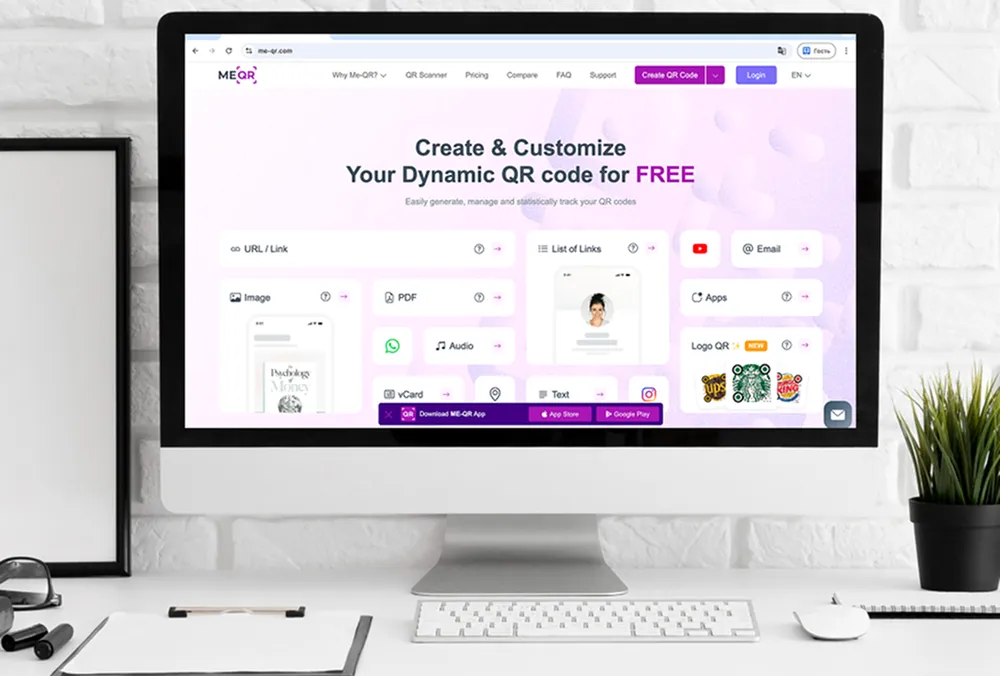
1. ME-QR
ME-QR is a practical choice for marketers who need more than a basic QR image. It supports dynamic QR codes, scan tracking, branded design, and many content types, which makes it useful for qr codes for marketing campaigns across print, retail, events, real estate, and social media.
The platform is especially convenient when a campaign uses several destinations at once. A marketer can create QR codes for landing pages, vCard contacts, documents, app pages, and social media profiles without moving between separate tools.
Key Features:
- Dynamic and static QR codes;
- Scan analytics;
- Custom colors, frames, and logo options;
- Multiple QR code types for marketing and business;
- Support for links, files, contacts, apps, and social media pages.
Pros:
- Wide choice of QR code types for different campaign goals;
- Dynamic QR codes can be edited after launch;
- Built-in scan analytics help compare campaign performance;
- Branding options make QR codes fit printed and digital materials;
- Suitable for links, documents, contacts, apps, and social media pages.
Cons:
- The number of QR types may feel broad for users who need only one simple code;
- Best results require testing the destination page and scan placement before launch.

2. Flowcode
Flowcode is mainly used for branded campaigns, events, and creator-focused promotions. Its focus is more visual, so it fits teams that need QR codes for posters, packaging, conferences, or social campaigns.
Key Features:
- Dynamic QR codes;
- Campaign analytics;
- Custom design tools;
- Mobile-focused QR experience.
Pros:
- Useful for event and creator campaigns;
- Includes design customization.
Cons:
- Some advanced features are limited in lower plans;
- Fewer QR content formats compared to ME-QR.

3. Beaconstac
Beaconstac is focused on enterprise QR campaigns, analytics, and integrations. It is more suitable for larger teams that manage QR codes across several departments, locations, or long-term campaigns.
Key Features:
- Dynamic QR management;
- Analytics dashboard;
- API and integration support;
- Team management features.
Pros:
- Suitable for larger companies;
- Includes advanced reporting tools.
Cons:
- Less beginner-friendly for small teams;
- Pricing may feel high for smaller businesses.

4. Scanova
Scanova is mainly used for editable QR codes and basic campaign tracking. It fits businesses that need to update links after printed materials are already distributed.
Key Features:
- Dynamic QR codes;
- Scan analytics;
- QR customization;
- Export formats for print materials.
Pros:
- Supports editable campaign links;
- Includes basic analytics tools.
Cons:
- Many features are available only in paid plans;
- Fewer QR content formats compared to ME-QR.

5. Uniqode
Uniqode focuses on larger business campaigns with analytics and team management tools. The platform is more oriented toward structured workflows and enterprise usage.
Key Features:
- Dynamic QR codes;
- Analytics dashboard;
- Team management;
- Integration support.
Pros:
- Suitable for larger teams;
- Includes campaign reporting tools.
Cons:
- Less convenient for simple campaigns;
- Higher pricing compared to simpler platforms.
6. Bitly QR Codes
Bitly QR Codes are mostly connected with short-link management and basic QR tracking. They are commonly used when QR codes are part of existing Bitly campaigns.
Key Features:
- Link-based QR codes;
- Scan tracking;
- Branded short links;
- Simple QR generation.
Pros:
- Easy integration with Bitly links;
- Useful for short URL campaigns.
Cons:
- Limited QR code types;
- Less flexible for broader marketing campaigns.

7. Canva QR Code Generator
Canva QR Code Generator is mainly used for adding QR codes into visual materials like posters or social graphics. The focus is more on design than campaign tracking.
Key Features:
- QR generation inside designs;
- Drag-and-drop editor;
- Marketing templates;
- Fast export.
Pros:
- Convenient for visual layouts;
- Simple creation process.
Cons:
- Limited analytics;
- Few options for trackable qr codes for marketing.
8. Adobe Express QR Code Generator
Adobe Express QR Code Generator is used mostly for simple promotional visuals and branded graphics with QR integration.
Key Features:
- QR generation;
- Graphic templates;
- Branding customization;
- Export tools.
Pros:
- Works for basic promotional materials;
- Simple interface.
Cons:
- Limited campaign analytics;
- Not focused on multi-format QR workflows.

9. The QR Code Generator
The QR Code Generator is a basic solution for creating standard QR codes without advanced marketing tools.
Key Features:
- Static QR codes;
- Basic customization;
- Common QR formats;
- Quick generation.
Pros:
- Fast setup;
- Beginner-friendly interface.
Cons:
- Limited analytics and editing;
- Fewer marketing features than ME-QR.
10. Shopify QR Code Generator
Shopify QR Code Generator is mostly aimed at online stores that want to connect QR codes with product or collection pages.
Key Features:
- Product page QR codes;
- Shopify integration;
- Simple export;
- Retail-focused usage.
Pros:
- Useful for Shopify stores;
- Easy product linking.
Cons:
- Limited outside e-commerce usage;
- Not suitable for broader multi-channel campaigns.

11. Hovercode
Hovercode focuses on branded QR codes and simple scan tracking for small business campaigns.
Key Features:
- Dynamic QR codes;
- Scan analytics;
- Branding tools;
- QR customization.
Pros:
- Includes basic tracking tools;
- Supports branded QR codes.
Cons:
- Fewer QR formats compared to ME-QR;
- More limited campaign flexibility.
Types of QR Codes for Marketing
Different campaigns need different QR formats. A code on a product label, a real estate sign, a restaurant menu, and a social media poster should not always lead to the same type of page. That is why ME-QR is useful for marketers: it lets teams choose the right QR format for the exact campaign goal instead of forcing every campaign into a simple link.
Dynamic QR Codes for Campaign Updates
Dynamic QR codes are useful when campaign details may change after launch. A marketer can print the code once, then update the destination later without replacing posters, flyers, packaging, or event materials.
This is helpful for seasonal offers, limited-time landing pages, event schedules, and A/B testing. For teams working with QR codes for marketing campaigns, dynamic editing can save both time and print costs.
Social Media QR Codes for Audience Growth
Social media QR codes help move people from offline materials to online profiles faster. A poster, table card, product insert, or event banner can send users directly to Instagram, Facebook, Telegram, or a full social profile hub.
With ME-QR, marketers can create codes for Instagram, Facebook, Telegram, or a broader social media page depending on the campaign. This works well for product launches, influencer promos, and local brand awareness.
Retail QR Codes for Product Pages and Offers
Retail campaigns often need a fast way to connect shoppers with product details, discounts, loyalty pages, or reviews. That is where how to use qr codes for retail marketing becomes practical: place the code near the product, on the package, on a shelf tag, or on the receipt.
For online stores and product campaigns, e-commerce QR codes can guide shoppers to product pages, special offers, or checkout-related content. The scan should lead to a page that matches the shopper’s moment: product details in-store, discount pages near checkout, or reviews after purchase.
Contact QR Codes for Sales Teams
Sales teams can use QR codes to share contact details without printed business cards going out of date. A scan can open a phone number, email, messenger, or contact card in seconds.
This format is useful at trade shows, consultations, real estate viewings, and business meetings. For example, a sales manager can use a phone call QR code when the main goal is to make follow-up contact easier.
Document and Content QR Codes
Some campaigns need to share more than a link. Marketers may need to send users to brochures, menus, catalogs, product instructions, price lists, or presentation materials.
In these cases, a QR code can lead to a file or text content instead of a regular webpage. ME-QR supports formats like text, which can work for short instructions, simple messages, or campaign details that do not need a full landing page.
How to Use QR Codes for Marketing
Even a well-designed QR code will not help much if the campaign around it feels unclear. Placement, destination page, and timing matter just as much as the code itself. Marketers usually get better results when the scan feels like a natural next step instead of an extra action.
Step 1. Set a Clear Campaign Goal
Before creating the code, decide what the scan should achieve. Some campaigns focus on website traffic, while others aim for app installs, bookings, purchases, social follows, or lead collection.
This also helps determine where to use QR codes for marketing. A restaurant may place them on menus and tables, while a retail brand may use packaging, shelf tags, or window posters.
Step 2. Choose the Right QR Code Type
Different goals require different QR formats. A product promotion may need a landing page, while an event campaign could work better with social links, a registration form, or contact details.
ME-QR is useful here because marketers can choose between links, files, social pages, app downloads, contact cards, and other formats inside one platform instead of creating everything through separate tools.
Step 3. Create a Mobile-Friendly Destination
Most users scan QR codes from their phones, so the destination page should load quickly and stay easy to navigate on smaller screens.
If a campaign leads to a long form, slow page, or confusing layout, people often leave before completing the action. That affects conversion rates even if the QR placement itself works well.
Step 4. Add Branding and a Clear CTA
A QR code usually performs better when people understand what happens after the scan. A short CTA like “View the Menu,” “Get the Discount,” or “Open the Product Page” gives users a reason to interact with it.
Branded colors or logos can also help the code fit naturally into packaging, posters, event stands, or printed advertising materials.
Step 5. Track Scans and Improve the Campaign
Campaign tracking helps marketers understand which placements bring results and which ones are ignored. This is one of the biggest advantages of using QR codes for marketing instead of relying only on printed URL.
With scan analytics, marketers can compare locations, campaign materials, or audience behavior and adjust future campaigns using real interaction data instead of assumptions.

How to Use QR Codes for Marketing Best Practices
Small details often decide whether a QR campaign gets ignored or scanned. Placement, design, page speed, and messaging all influence how people interact with the code in real situations.
- Place QR codes where scanning feels natural.
- Add a short CTA that explains what users will get after scanning.
- Test the QR code on different mobile devices before publishing.
- Use dynamic QR codes for campaigns that may need future updates.
- Match the QR design with the brand style and campaign materials.
- Review scan analytics regularly to improve campaign placement and timing.
Marketers who follow these steps usually get more value from trackable QR codes for marketing because they can see what actually drives engagement instead of relying only on impressions or printed reach.
It also helps to avoid overloading users with too many QR codes in one place. One clear action often performs better than several competing scan options on the same poster, menu, package, or flyer.
Conclusion
QR codes for marketing are no longer limited to simple website links. Brands now use them for product promotions, local advertising, social media growth, lead collection, app downloads, event campaigns, and customer engagement across both digital and physical channels.
The most useful platforms are the ones that help marketers manage more than just the QR image itself. Dynamic editing, analytics, branding tools, and support for different QR formats make campaigns easier to launch, test, and improve over time.
ME-QR stands out because it combines these features in one place without forcing marketers to switch between several tools for links, files, contacts, apps, or social campaigns. For teams working with qr codes for marketing campaigns, that flexibility makes everyday campaign management much easier.
Frequently Asked Questions about Top QR Code Generators Every Marketer Should Use
Start with one clear goal: send users to a landing page, offer, app page, booking form, or social profile. Then place the QR code where scanning feels natural and make sure the destination page works well on mobile.