Some useful Things for you
We have selected some interesting things that may be interest for you
Best QR Code Tools with Advanced Analytics in 2025
To create a QR code for a link, video or picture - click on the button below.

Article Plan
- Overview of QR Code Tools with Analytics
- What Are QR Code Analytics and Why Are They Valuable
- How We Selected the Best QR Tools for Analytics
- Top 7 QR Code Generators with Tracking and Analytics
- 1. ME-QR
- 2. Uniqode
- 3. Bitly
- 4. Flowcode
- 5. Hovercode
- 6. Scanova
- 7. Delivr
- Benefits of QR Code Analytics Tools
- Comparative Table of QR Code Generators with Analytics
- How to Leverage QR Code Analytics for Success
- Ready to Get Started?
Overview of QR Code Tools with Analytics
The following table provides a concise summary of the seven QR code tracker tools covered in this article, outlining their key features and primary use cases for analytics.
What Are QR Code Analytics and Why Are They Valuable
QR code analytics involve collecting data from QR code scans to gain insights into user behavior and campaign performance. Unlike static QR codes, which link to fixed content, dynamic QR codes allow content updates and track metrics like scan locations, times, and devices. This is essential for businesses optimizing marketing strategies, as analytics reveal how audiences engage with codes. For instance, QR code attendance tracking streamlines event management, while integration with external tools enhances campaign analysis. In 2025, analytics-driven QR code tools are critical for measuring ROI, refining targeting, and improving user experiences, making them a cornerstone for effective digital strategies.How We Selected the Best QR Tools for Analytics
Choosing the right QR code generator and tracking tool involves assessing both its analytics features and overall ease of use. We assessed tools based on specific criteria to ensure they meet diverse needs for track QR code scans. Our methodology involved testing each platform’s free and paid features, analyzing analytics depth, and verifying user experience.
- Analytics Quality: Tools must offer detailed metrics like scan counts, locations, and device types.
- Dynamic QR Support: Prioritized platforms with editable QR codes for campaign flexibility.
- External Integrations: Evaluated compatibility with tools like Google Analytics or CRMs.
- Free Version Access: Assessed analytics and features available without payment.
- Scalability Options: Considered support for bulk creation and enterprise use.
- Ease of Navigation: Ensured intuitive interfaces for efficient QR code management.
Top 7 QR Code Generators with Tracking and Analytics
1. ME-QR
ME-QR is a leading platform for creating, managing, and analyzing QR codes, offering a robust QR code tracking system for personal and professional use. It supports diverse QR code types, including URLs, vCards, PDFs, social media links, WiFi, emails, SMS, coupons, forms, menus, apps, payments, and reviews, catering to a wide range of applications. The free version allows static QR code creation without registration, while a free account unlocks dynamic QR codes with QR code scan tracking, including scan locations, times, devices (iOS, Android), and engagement trends, exportable in CSV or PDF formats. ME-QR supports bulk QR code creation for large campaigns and offers API integrations for enterprise automation. Customization includes logos, colors, frames, and custom domains, ensuring branded QR codes. The platform’s intuitive dashboard simplifies track QR code tasks, making it accessible for all users. ME-QR also supports QR code tracking in Google Analytics via UTM parameters, enhancing campaign insights. Its scalability and versatility make it ideal for businesses and individuals alike.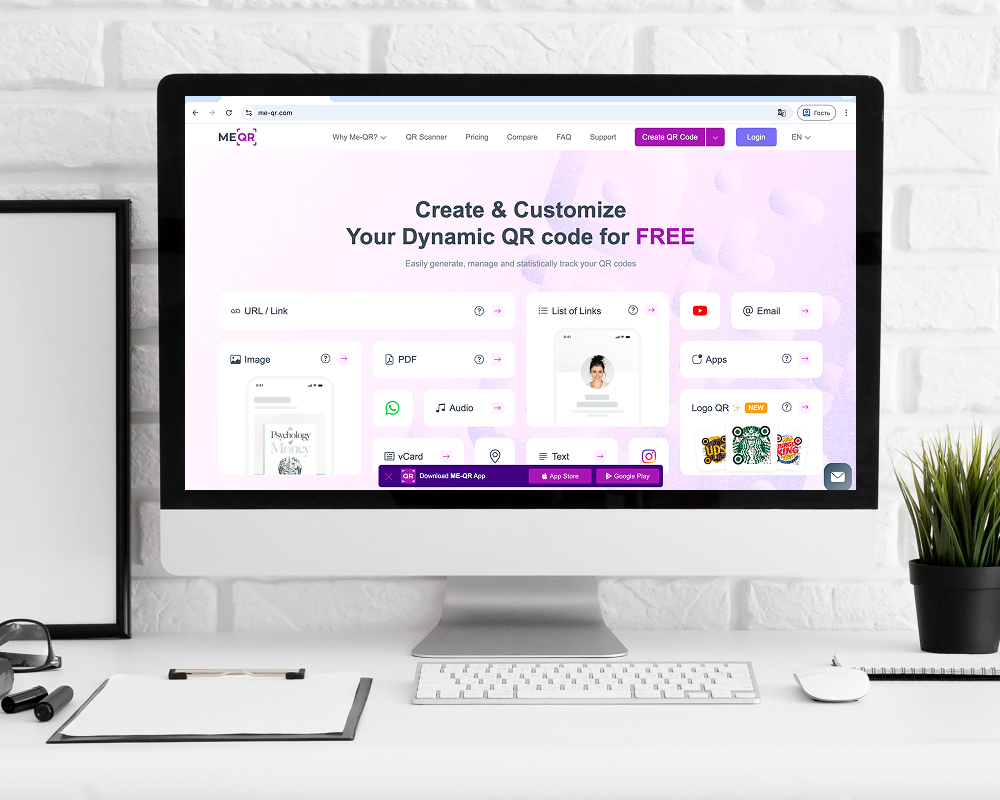
Pros and Cons
ME-QR’s features make it a top choice for QR codes with tracking, but it’s worth noting its strengths and limitations.
Pros:
- Free static QR codes without registration.
- Dynamic QR codes with analytics via free account.
- Detailed tracking QR code scans (location, time, device).
- Bulk QR code creation for campaigns.
- API integrations for enterprise use.
- Extensive customization (logos, colors, custom URLs).
Cons:
- Advanced analytics require a free account.
- Some premium features, like ad-free analytics, need a paid plan.

2. Uniqode
Uniqode (formerly Beaconstac) is an enterprise-focused platform for tracking a QR code, offering dynamic QR codes for URLs, vCards, landing pages, and app downloads. The free plan provides limited static QR codes, while paid plans unlock QR code tracking with analytics for scan locations, devices, times, and user engagement. Uniqode supports over 5000 integrations, including Google Analytics, Salesforce, and Zapier, making it ideal for complex workflows. Customization includes logos, colors, and branded landing pages, with features like anomalous scan detection for data accuracy. The platform is SOC-2 and GDPR compliant, ensuring enterprise-grade security. However, its free plan lacks dynamic QR codes and analytics, and the interface has a steeper learning curve for beginners.
Pros and Cons
Uniqode offers robust QR code tracking system features, but its free version is limited.
Pros:
- Advanced analytics for scan locations and devices.
- Extensive integrations (Google Analytics, CRMs).
- Customizable QR codes with branding options.
- Enterprise-grade security (SOC-2, GDPR).
- Supports bulk QR code creation.
Cons:
- Free plan limited to static QR codes.
- Steeper learning curve for new users.
3. Bitly
Bitly, renowned for link shortening, offers a QR code generator and tracker with dynamic QR code capabilities. It supports QR codes for URLs, social media, and forms, with the free plan providing two dynamic QR codes per month and basic analytics for scan counts and locations. Paid plans unlock deeper track QR codes with Google Analytics via UTM parameters and more dynamic QR codes. Customization includes colors and logos, though options are less extensive than specialized QR platforms. Bitly’s strength is its seamless integration with its link management ecosystem, ideal for marketers already using Bitly. The free version suits small projects but limits advanced QR code tracking software features.
Pros and Cons
Bitly provides reliable tracking QR code scans, with constraints in the free tier.
Pros:
- Free dynamic QR codes (two per month).
- Basic analytics for scan counts and locations.
- Google Analytics integration via UTM parameters.
- Basic customization (colors, logos).
- Integrated link management platform.
Cons:
- Limited dynamic QR codes in free plan.
- Advanced analytics require a paid subscription.

4. Flowcode
Flowcode focuses on design-driven QR code for tracking, offering dynamic QR codes with analytics for marketing. It supports URLs, social media, and digital business cards, with the free plan providing two dynamic QR codes and basic analytics for scan counts and locations. Paid plans unlock QR code tracking with Google Analytics and deeper metrics. Customization includes colors, patterns, and logos, though advanced options like custom backgrounds are premium. The interface is user-friendly but can feel overwhelming due to multiple options on a single page. Flowcode integrates with tools like Tableau for advanced data visualization, making it suitable for branding-focused campaigns.Pros and Cons
Flowcode balances design and track QR code scans, with free version limitations.
Pros:
- Free dynamic QR codes (two per month).
- Basic analytics for scan counts and locations.
- Extensive customization (colors, patterns, logos).
- Integration with data visualization tools.
- User-friendly for beginners.
Cons:
- Limited dynamic QR codes in free plan.
- Advanced analytics and customization require payment.
5. Hovercode
Hovercode is a straightforward platform for create QR code with tracking, offering dynamic QR codes for URLs, vCards, PDFs, and app links. The free plan includes unlimited dynamic QR codes with basic analytics for scan counts and locations, making it a strong QR code tracker for small businesses. Paid plans unlock deeper metrics like device types and time-based trends. Customization includes logos, colors, and templates, with a simple interface ideal for beginners. Hovercode lacks advanced integrations like CRMs but supports track QR code Google Analytics via UTM parameters. Its focus on simplicity makes it accessible but less suited for enterprise needs.
Pros and Cons
Hovercode offers solid tracking QR code features, with some limitations.
Pros:
- Unlimited dynamic QR codes in free plan.
- Basic analytics for scan counts and locations.
- Customization (logos, colors, templates).
- Simple and beginner-friendly interface.
- Google Analytics integration via UTM.
Cons:
- Limited advanced analytics in free plan.
- No CRM or enterprise integrations.
Best for: Small businesses and individuals needing simple dynamic QR code tracking with free analytics.

6. Scanova
Scanova provides a reliable QR code generator with tracking for dynamic QR codes, supporting URLs, vCards, social media, and WiFi. The free plan offers static QR codes, while paid plans unlock dynamic QR codes with analytics for scan counts, locations, and devices. Scanova’s analytics dashboard is straightforward, with options for tracking QR codes in Google Analytics via UTM tagging. Customization includes colors and logos, though advanced design options are limited. The platform supports lead generation lists and enterprise features like white-labeled landing pages. Its interface is user-friendly, but free users miss out on QR code attendance tracking capabilities.Pros and Cons
Scanova offers solid best QR code tracking, with free version constraints.
Pros:
- Free static QR codes with basic customization.
- Dynamic QR codes with analytics in paid plans.
- Google Analytics integration via UTM tagging.
- Customization (colors, logos).
- Lead generation and enterprise features.
Cons:
- No dynamic QR codes in free plan.
- Advanced analytics require a subscription.
7. Delivr
Delivr is a platform focused on QR code tool tracking for connected packaging, smart labels, and media. It supports dynamic QR codes for URLs, vCards, and multimedia, with analytics tracking scan counts, locations, devices, and engagement patterns. The free plan is limited to a 14-day trial with dynamic QR codes and basic analytics, while paid plans offer deeper tracking QR codes capabilities. Customization includes logos and colors, with support for immersive experiences like augmented reality. Delivr’s interface is intuitive but tailored for enterprise use, with features like API integrations for automation. Free users face trial limitations, requiring a subscription for full access.
Pros and Cons
Delivr provides robust track QR codes, with trial-based free access.
Pros:
- Dynamic QR codes in 14-day free trial.
- Analytics for scan counts and locations.
- Customization (logos, colors).
- Supports augmented reality QR codes.
- API integrations for enterprise use.
Cons:
- Free access limited to 14-day trial.
- Advanced analytics require a paid plan.

Benefits of QR Code Analytics Tools
QR code analytics tools provide critical insights for optimizing campaigns and enhancing engagement. These platforms enable businesses to track performance and refine strategies effectively.
- Actionable Data: Monitor scan metrics to adjust campaigns in real time.
- Audience Insights: Use location and device data to target specific demographics.
- Performance Tracking: Measure ROI with detailed scan and user engagement analytics.
- Flexibility: Update dynamic QR codes without reprinting for campaign agility.
- Integration Options: Connect with external tools for comprehensive analysis.
Comparative Table of QR Code Generators with Analytics
|
Feature
|
ME-QR
|
Unicode
|
Bitly
|
Flowcode
|
Hovercode
|
Scanova
|
|
Free Static QR Codes
|
Yes
|
Yes
|
Yes
|
Yes
|
Yes
|
Yes
|
|
Free Dynamic QR Codes
|
Yes (with account)
|
No
|
Yes (2/month)
|
Yes (2/month)
|
Yes (2/
unlimited
) |
No
|
|
Analytics
(Scans, Location, Device)
|
Yes (with account)
|
Paid
|
Limited
|
Limited
|
Limited
|
Paid
|
|
Google Analytics Integration
|
Yes (with account)
|
Yes
|
Yes
|
Paid
|
Yes
|
Yes
|
|
Customization (Colors, Logos)
|
Yes
|
Yes
|
Yes
|
Yes
|
Yes
|
Yes
|
|
Bulk Creation
|
Yes (with account)
|
Yes
|
Paid
|
Paid
|
Paid
|
Paid
|
|
API Integration
|
Yes
|
Yes
|
Paid
|
Paid
|
Paid
|
Paid
|
How to Leverage QR Code Analytics for Success
Unlocking the full potential of QR code analytics means using scan data strategically to fine-tune campaigns and boost user engagement across multiple channels. By analyzing scan insights, businesses can enhance marketing precision, better target their audience, and optimize internal processes. Below are key tactics to help you get the most out of QR code tracking and ensure your campaigns achieve meaningful results.
- Test and Optimize QR Code Designs: Conduct A/B tests with different QR code visuals, such as colors, logos, or frames, to identify which designs drive higher scan rates and user engagement.
- Target High-Traffic Regions: Use geographic scan data to pinpoint high-traffic areas, allowing you to focus marketing efforts on locations with the most audience interaction.
- Optimize for Device Types: Analyze device data (e.g., iOS vs. Android) to tailor content for specific platforms, ensuring a seamless user experience across devices.
- Track Campaign Performance Over Time: Monitor time-based scan trends to understand peak engagement periods, enabling you to schedule campaigns for maximum impact.
- Integrate with External Tools: Connect QR code data with platforms like Google Analytics using UTM parameters to gain deeper insights into user behavior and campaign ROI.
- Streamline Event Management: Implement QR code attendance tracking to monitor check-ins, reduce manual processes, and gather real-time attendance data for events.
- Refine Content Strategy: Use engagement metrics to adjust linked content, such as landing pages or promotions, to better align with audience preferences.

Ready to Get Started?
Frequently Asked Questions about Best QR Code Tools with Advanced Analytics in 2025